Categories
Blog Uncategorized

DocPP: New Feature for Research Purposes

Time to time new features are adding to the DocPP Private Practice Software Free of charge for all the clients.

Ministry of Health, Sri Lanka is offering additional funds for the research activities as an motivation factor for all the Sri Lankan Government Doctors as lucrative incentive.

Having complete data record set can play major role in Trend analysis and plays vital role in the research perspectives.

Based on this new feature now all DocPP users can search their record set based on “Presenting Complaint, Diagnosis, Management Plan & Next Visit Date” for given any search period of time.

Furthermore, system has given capability to download this full report as EXCEL file which can be used for further analysis through a comprehensive statistical software like SPSS.

Categories
Blog

DocPP POSTPAID 10,000 LKR OFF…

SPECIAL DISCOUNT FOR DOCPP POSTPAID HAVING 20,000 LKR OFF (with next price increment) FOR ONLINE BUYERS!!

​DocPP POSTPAID Subscription is increasing every 6 months for the new postpaid customers.​ The current rate is: 110,000LKRCoupon Value: 10,000 LKRIf you buy before 30th June via the above-mentioned link, It will be: 100,000LKR

USE COUPON CODE: “DocPOST10OFF

 DocPP POSTPAID Software Fee after 1st July 2021: 120,000 LKRAnnual Server Maintenance Fee: 25,000 LKR

https://healthcare.lk/product/docpp-postpaid

Categories
Blog

Hi Doctor, Is these travel restrictions have affected your Private Practice? We have a solution for it…

Corona Pandemic situation urges Governments to impose travel restrictions in order to mitigate daily Corona infection counts…which severely affects all the businesses including Medical Doctor Private Practices.

We have a lucrative win-win solution without an additional cost…

  1. Buy DocPP PREPAID if you still haven’t it. (Learn more)
  2. Ready your patient database.
    1. Register Name, Address & Contact number details (minimum) of existing patients referring to your manual patient books.
    2. Or, Register the patient detail on the go as they reach you.
  3. Arrange drug delivery
    1. Meet close by Retail-pharmacy (you can have multiple pharmacies at a time) and tell them that you are going to send patients via DocPP platform.
    2. From your Administrator account create separate ‘Retail Pharmacy’ type new user accounts for the agreed Pharmacy owners or the dispensers who are there.
  4. Send BuLK SMS to all your patients that you are available for Online Prescribing. (Learn more)

Work flow

  1. Patients will call you after seeing your SMS notification.
  2. Register their personal details and add a prescription to the system
    1. Prescribe the drug as ‘Pharmacy” under the drug prescription window.
  3. Tell the patient to visit one of the Retail Pharmacy which we have agreed.
  4. Now, Patient visits the Retail Phamacy and he/she may inform that he is from you.
  5. Retail Phamacy user login into the DocPP.
  6. He can see;
    1. Patient’s Name
    2. Age
    3. Address
    4. Contact number
    5. Prescribed Drugs by the Doctor.
    6. Doctor’s (your) name
    7. Your medication charge
    8. And a ‘PAY’ button
  7. Retail Pharmacist will give the drug and take the Doctor’s (your) charge as well.
  8. The patient happily gets the drugs and goes home. (Current curfew doesn’t affect patient to go Pharmacy)
  9. Later Pharmacist will credit your balance to your account.

Win-win Theory

In Patient’s angle;

  1. Patients want to get the medicines but you (your medical center) have closed or the patient reluctant to meet a health staff face-to-face.
  2. But, Drugs have to be taken.

You (Private Practice)

  1. You cannot treat your patients in this difficult situation.
  2. You also have the risk to meet the patient face-to-face.
  3. You losing the patients.
  4. Affects your monthly revenue.
  5. But DocPP allows you to run your practice having minimum risk.
  6. You are happy with DocPP proposed method.

Retail Pharmacist

  1. Get a new customer segment.
  2. More businesses.
  3. More revenue.
  4. Happy Pharmacist will give the maximum support to you.


Lean about Bulk SMS Service


Categories
Blog

BNF 80 integrated with DocPP

BNF 80 & BNF Children 2021 (Sep) has integrated with DocPP now.

175701150_1193496761083876_105328835065066072_n

BNF 80

3

Categories
Blog

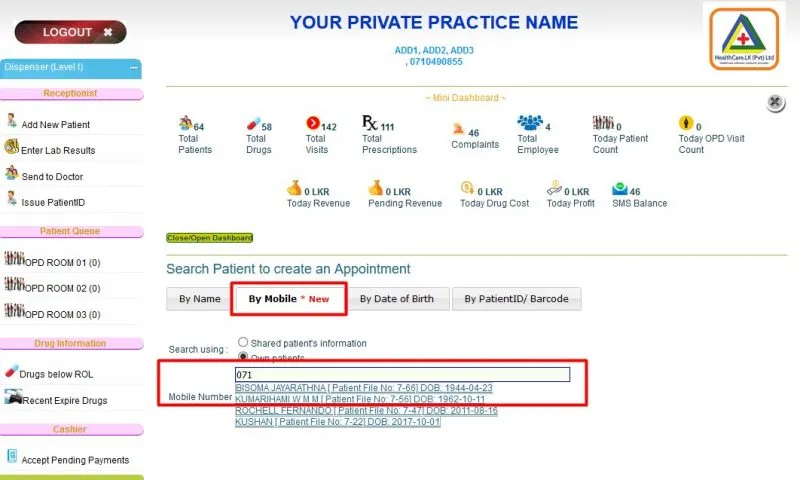
Search patients using the MOBILE Number

Now you can search patients using the MOBILE Number too.
 
As you already know linen-mole-502544.hostingersite.com/ is adding more & more features to the DocPP product.
 
All of these updates are FREE to all users..

Categories
Blog

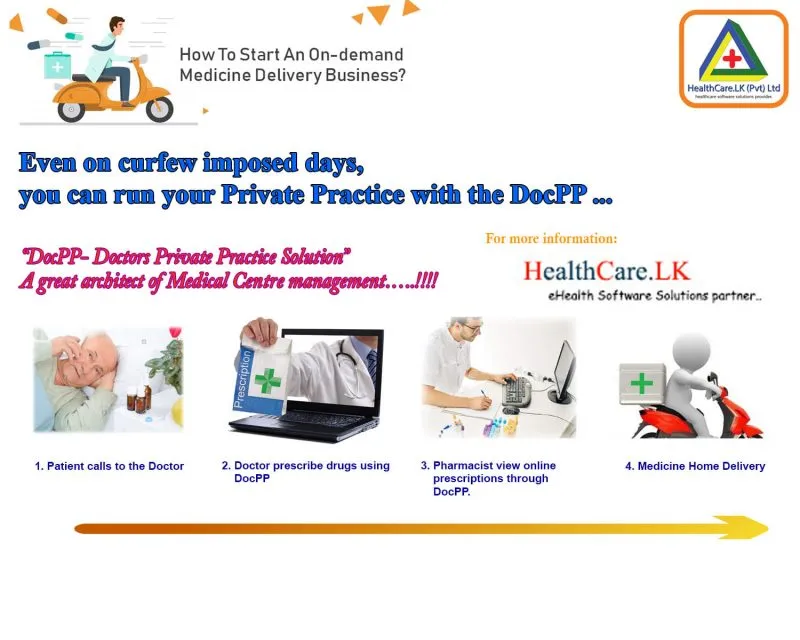
On curfew imposed days, you can run your Private Practice…

Even on curfew imposed days, you can run your Private Practice with the DocPP given system features….

1. First discuss with a nearby retail pharmacy that has internet access.

2. Create a new user as “Cashier Only” to the newly agreed pharmacy.
 
3. Using DocPP Bulk-SMS service inform all your regular patients that you are available over the telephone. Then Patients will call you for their medical requirements while they stay at home.

4. You just logged in to the DocPP system and generate online prescription which can be seen by the ‘Cashier” type user you created for the Retail Pharmacy. These days, other retail pharmacies can open even under this Covid Pandemic.


5. Patient goes to the Retail Pharmacy and inform that he is from DocPP.

6. Retail Pharmacist can see the prescribed drugs and Doctor’s charge

7. Take the doctor’s charge and issue the drugs to the patient.

8. Patient, Doctor & Retail Pharmacist happy owing to their benefits even though curfew has imposed.

9. The pharmacist will credit total doctor charges to the Doctor via Ezy cash or any other online transfer method.

Categories
Blog

Bulk SMS Service

Bulk SMS Service along with your DocPP Account at FREE OF CHARGE to all our clients.

We introduce Bulk SMS Service along with your DocPP Account at FREE OF CHARGE to all our clients. You will use Bulk SMS for;* Address your whole patient base* Send health package information* About your availability and holidays* retain your patients with your PP How to use it? 1. You will see this kind of option list under the ‘Administrator’ panel;2. Purchase SMS packs (You can do online payment even via your debit card)3. You will receive a payment receipt to your email and credit the purchase SMS balance.You will see your SMS balance under MINI Dashboard4. Click “Send SMS to all Patients” under the “Administrator” panel5. Type your SMS messageYou will be charged according to the number of SMSes in your message6. Click the “Send Now” button to send the SMSHow to see my past SMS expenditure;Go “SMS Expenditure” under the “Administrator” panelPurchase your first SMS bundle without postponing…

buy SMS packs
Send BULK SMS to the all the Patients in the PP
DocPP SMS Expenditure

Previous
Next

Ask questions